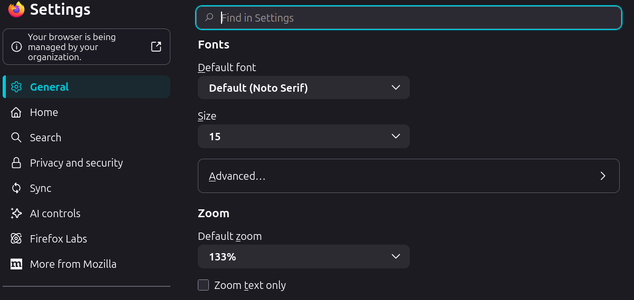
I actually went 133%,doesn't overfill the screen.Using Firefox on a 15" laptop.I was just trying to change it on my end . Zoom to 100 % helped the size . Not the brightness .

Follow along with the video below to see how to install our site as a web app on your home screen.
Note: This feature may not be available in some browsers.
I actually went 133%,doesn't overfill the screen.Using Firefox on a 15" laptop.I was just trying to change it on my end . Zoom to 100 % helped the size . Not the brightness .
Later to the show so some of the bugs have been adjusted.
Only logged on with desktop platform so far and uh um OK. I'll try it mobile in a day or so.
I've never understood the desire to rebrand (change) something that wasn't broken
The only thing I don't like so far is the "Who read this article". I never noticed this prior if it was already in place as I rarely read articles.
I like my ability of +Lifetime Premier+ to stay hidden unless I choose to respond to a thread.
Where is the zoom to increase text size on the new forum layout?I actually went 133%,doesn't overfill the screen.Using Firefox on a 15" laptop.
I did it within Firefox settings.Where is the zoom to increase text size on the new forum layout?
My top and bottom used to be orange. Anyway to change it back?
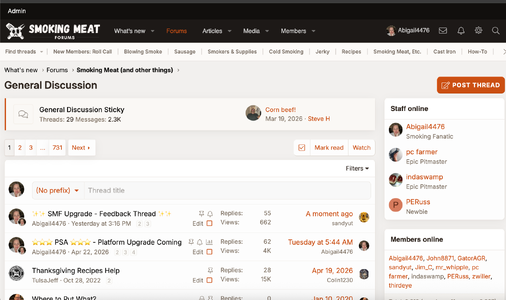
I feel like I'm losing my mind, but where is the box to post a new thread? I'm sure it's right in front of my face, but for the life of me I can't find it.
I use the site mostly for talking with some " friend " memebers and answering questions I get asked .
The icons for PM's and alerts are super small for me ( maybe a setting on my end ) , and they are so dim , they are hard to see . I had to go back to light mode just to see them .
For me... Read and unread color/contrast of the title is hard to diffientiate between the two in dark mode... A little better in white...
Ah, thanks Norm. The old system had a button on the system where you could choose between 3 or 4 different type sizes.I did it within Firefox settings.
I feel like I'm losing my mind, but where is the box to post a new thread? I'm sure it's right in front of my face, but for the life of me I can't find it.
First impressions, I like it.
Couple things if tweakable: brighter font on dark screen, larger font or user adjustable font would be great. Old guy vision is not so good.
When I try to add a user with @xxxx its doesnt autofill the name list like it used to? Is it me?
@Abigail4476 Thank you for all your work on our site!
Thanks! I see that if I enter the list of forums, but not if I'm out on the main page. Anyway, I found it, but seems like it needs some tweaking.@GatorAGR, I have light mode on right now - it's the orange button at the top right of my screen. I haven't looked at mobile, not sure if you're on a desktop or phone/other device.