• Some of the links on this forum allow SMF, at no cost to you, to earn a small commission when you click through and make a purchase. Let me know if you have any questions about this.

✨✨ SMF Upgrade - Feedback Thread ✨✨

SmokingMeatForums.com is reader supported and as an Amazon Associate, we may earn commissions from qualifying purchases.
I JUST GOT BACK INTO TOWN AFTER GETTING READY FOR A MOVE DOWN TO TEXAS. THINGS SEEM TO WORK FINE HERE, I'LL POST SOME JOKES AS SOON AS I FIND WHERE THEY ARE NOW. I'D POST A COOK BUT AT MY AGE THERE'S NOTHING MUCH I HAVEN'T COOKED AND POSTED BEFORE, NO SENSE DOING ALL THAT TYPING FOR THE SAME THING, AND MY KITCHEN CAMERA IS ALREADY PACKED TO GO.
 
@clifish changing that setting in the preferences fixed it up just right.
 
If the alerts are for the same thread , and you go look at one , the rest for that thread will stay in the list , but no longer show as a new alert .
 
If the alerts are for the same thread , and you go look at one , the rest for that thread will stay in the list , but no longer show as a new alert .
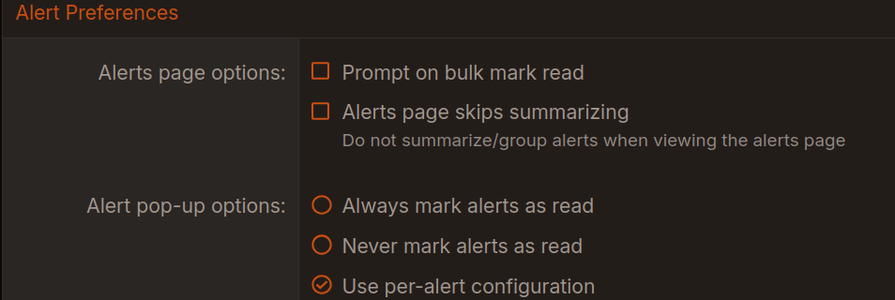
This is different. Now when you click on the bell at the top of the screen all alerts go away. I just had 6 alerts in different threads. The notifications are still listed but the alerts go away.

EDIT: I went into preferences, Alerting preferences and chose Use custom and unchecked all the popup-auto-read on all the boxes. I will see if that helps.

EDIT2 the next day. I can confirm this does fix it.

popup_auto_read3.jpg
 
Last edited:
I like it so far. Changed to dark mode on PC.

One thing on PC. I liked your original post here but when I went back it was gone.
I noticed a [Show Only: Unread+] bubble at the top of the screen.
When the bubble clicked it shows them.

After that when the page is refreshed or you later return the unread threads are gone again and the bubble returns.

Please make it so read threads show up but can be another color but not removed from view. If this is an option in your user settings I have not found it.

I found my own answer to this. If you click on Filters, uncheck what you want and select Save as default the See only read filters box is removed.

filters2.jpg
 
Last edited:
I unchecked the "Prompt on bulk mark read" box. I think that might be the culprit,I'll let everyone know later.
 

Attachments

  • Screenshot at 2026-05-24 06-16-28.png
    Screenshot at 2026-05-24 06-16-28.png
    44 KB · Views: 18
Appreciate you guys figuring out the fix for this! I've had a busy couple of days.

@normanaj I went in and tagged all the OTBS members on the original thread roster. I'm guessing that's how you were notified of your status? lol 😂

Getting ready to install a button to make finding the credo and roster a little simpler.
 
Unchecking the "Prompt on bulk mark" read did not work.

But I do believe when you uncheck "Pop-up auto-read" next to the appropriate category(ies) those messages will remain unread until you click on them. And now confirm this works you just have to uncheck which categories you don't want to be tagged as "auto-read", I simply unchecked all of them.
 

Attachments

  • Screenshot at 2026-05-24 11-14-08.png
    Screenshot at 2026-05-24 11-14-08.png
    4.7 KB · Views: 16
Last edited:
I didn't realize this thread existed the other day when I started a thread to let y'all know the pull down menu under the Forums header isn't working. I like to mark the forums read b4 leaving each time I'm here. Thought I'd mention it again in this thread to keep it current.
 
Where is the zoom to increase text size on the new forum layout?
Providing your are on a windoze machine, press and hold the Ctrl key and then press either the + or - key to increase or decrease the font size. Works on most any site.
 
I didn't realize this thread existed the other day when I started a thread to let y'all know the pull down menu under the Forums header isn't working. I like to mark the forums read b4 leaving each time I'm here. Thought I'd mention it again in this thread to keep it current.
Can you clarify this a little? Right now the sub-navigation will show on each selected forum tab. So while browsing the forum area, you'll see all the links just below (Mark forums read is at the end).

If you're browsing Articles/Media, you'll see the dropdown for Forums.
 
I haven't looked into the settings...
When i get multiple email alerts I used to be able to the click on the latest email and it took me to the my last read message. Now it is the same as alerts and go to the last post.
 
Can you clarify this a little? Right now the sub-navigation will show on each selected forum tab. So while browsing the forum area, you'll see all the links just below (Mark forums read is at the end).

If you're browsing Articles/Media, you'll see the dropdown for Forums.
At the top of the main forums page to the right of the Smoking Meat Forums there are the drop downs.
The Forums drop down is red(for me) while the others are white on the version of the page I'm using and the Forums drop down does Not work while the others do work.
I like to drop down and mark the forums read every day just before leaving. Haven't been able to do that since, I guess, the upgrade.
 
Can you clarify this a little? Right now the sub-navigation will show on each selected forum tab. So while browsing the forum area, you'll see all the links just below (Mark forums read is at the end).

If you're browsing Articles/Media, you'll see the dropdown for Forums.
Just found out if I go to the main home page and click on Forums the forums pull down works.
However if I click on, and go to, What's New the Forums pull down header is red and does not work there either, just like when I'm on the forums page.

ETA - The Forums drop works fine on the articles, media, and members pages but not on the what's new or forums pages.
 
Just found out if I go to the main home page and click on Forums the forums pull down works.
However if I click on, and go to, What's New the Forums pull down header is red and does not work there either, just like when I'm on the forums page.

ETA - The Forums drop works fine on the articles, media, and members pages but not on the what's new or forums pages.
Ok buddy I am with you now. I followed what you did and it repeated the same for me. Seems a little funny. I am sure the admins will work it out. I have no clue how all the website magic works, but it seems complicated.
 
I may be repeating a question, but when I click on the Alerts/Notifications the new ones used to be more bold, now it doesn't look any different from the ones I've already clicked on.
Screenshot_20260526_183701_Chrome.jpg

@Rafter H BBQ was the new one, but looks the same as the ones I already checked
 
SmokingMeatForums.com is reader supported and as an Amazon Associate, we may earn commissions from qualifying purchases.
Back
Top
Clicky