Any Android Geeks?

  • Some of the links on this forum allow SMF, at no cost to you, to earn a small commission when you click through and make a purchase. Let me know if you have any questions about this.
SmokingMeatForums.com is reader supported and as an Amazon Associate, we may earn commissions from qualifying purchases.

BrianGSDTexoma

Legendary Pitmaster
Original poster
OTBS Member
★ Lifetime Premier ★
Aug 1, 2018
8,820
10,380
North Texas, Texoma
I just went from a Moto G 2023 to a 2025 model with android 16. I play music at the river on my Block Rocker using Spotify. I cant not figure out how to stop calls and messages from coming through my speaker. I have spent hours now trying to figure it out even going through support. Phone thinks its a headphone and there is no option to turn phone calls off like other bluetooth speakers. I might of went through this with last phone? At this point i am going to just have to use old phone for music which means carrying two phones.
 
Last edited:
Do not disturb set to on , with an exception for media / Spotify .
Should stop all calls , but allow streaming .
 
Go to settings then blue tooth, pick the blue tooth device you are connecting with and then the settings icon next to it. gives you the option to turn calls on or off when connected to that device.
 
  • Like
Reactions: chopsaw
Go to settings then blue tooth, pick the blue tooth device you are connecting with and then the settings icon next to it. gives you the option to turn calls on or off when connected to that device.
calls will ring through the speaker but when you answer the phone call will be through the phone only.
 
Go to settings then blue tooth, pick the blue tooth device you are connecting with and then the settings icon next to it. gives you the option to turn calls on or off when connected to that device.
I dont have that option which is the problem

image2593[1].png
 
That's something I haven't seen with Android. I'm sure you have tried but the pencil next to Block Rocker doesn't take you to a new screen with settings?
 
That's something I haven't seen with Android. I'm sure you have tried but the pencil next to Block Rocker doesn't take you to a new screen with settings?
No it just lets you change the name. Kind of at the point of giving up. Phone thinks it is headphones but there should still be a way to turn off phone calls. I did it on old phone but just dont know what it was. I have a newer Block Rocker Plus and it doing the same thing.
 
Go to your list of Bluetooth connections on the phone. On my pixel pro I swipe down and then click on the Bluetooth icon for that list. Next to each Bluetooth connection you have saved there should be a gear icon. Click the gear, there will be a list of things you do or don't want to go through Bluetooth.
Screenshot_20251211-064803.png
Screenshot_20251211-064827.png
 
Last edited:
Go to your Bluetooth settings for the phone. It should just your connections. Next to each Bluetooth connection you have saved there should be a gear icon. Click the gear, there will be a list of things you do or don't want to go through Bluetooth.
I have. It just missing the one I want. Works on my smaller Bluetooth speaker just not on my big one. I have spent another hour this morning trying to figure it out. I think I just going to have to use my old phone for music.
 
I have. It just missing the one I want. Works on my smaller Bluetooth speaker just not on my big one. I have spent another hour this morning trying to figure it out. I think I just going to have to use my old phone for music.
The new speaker isn't in the list?
 
BrianGSDTexoma BrianGSDTexoma I have the same phone as you.

Both my JBL speakers don't allow for that feature but my Bose speaker does.In my case it's not so much the phone as it is the speakers.I'm not one to use the companion app with the speakers but I'm going to install the JBL app and see if can be done thru it.

edit: no option within the JBL app.
 
Last edited:
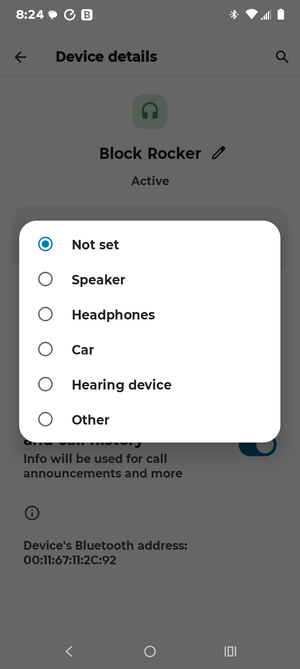
Interesting it picks one up as speaker and one as not set. Can you change that? Did you try to forget the device and re- pair it? Definitely odd. It appears to be more an issue with the speaker vs Android.
Yes but makes no difference.
 

Attachments

  • Screenshot_20251211-082455_Settings.png
    Screenshot_20251211-082455_Settings.png
    86 KB · Views: 0
Try turning on allow access to contacts and call history .
See if that gives you the phone on / off option .
 
SmokingMeatForums.com is reader supported and as an Amazon Associate, we may earn commissions from qualifying purchases.

Hot Threads

Clicky